
Workflow Envy

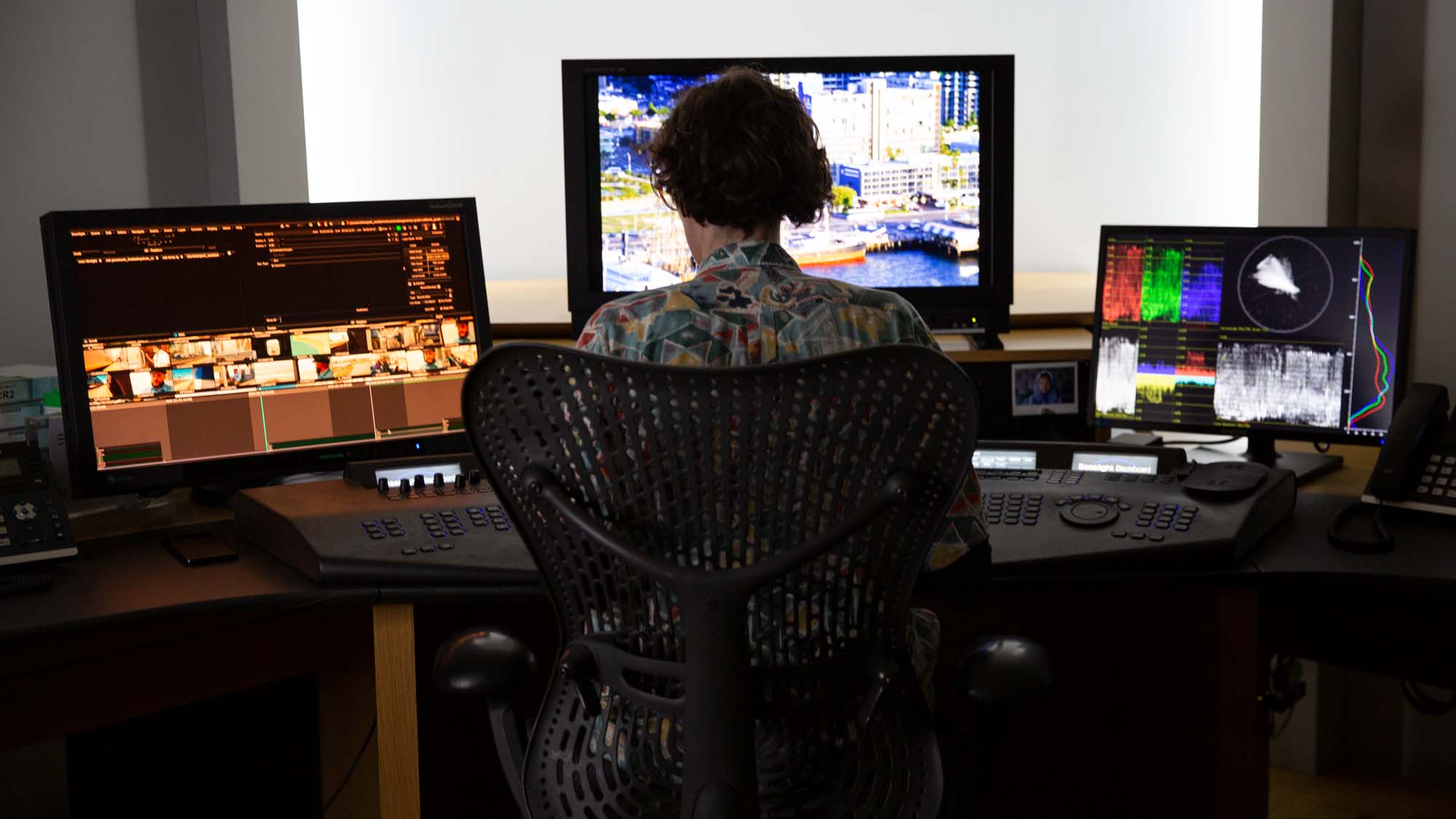
In the middle of Soho, London’s long standing post production heart, you’ll find ENVY. Across two decades, ENVY has evolved to become one of the world’s leading end to end post-production facilities, known for cutting-edge digital post services including DIT and media management, grading, VFX, editorial and more.
ENVY juggles a wide range of complex projects for high-profile clients, working nearly 24/7. With tight budgets, the pressure to stay efficient while accurate can be intense. A singular overlooked clip or misplaced audio file can disrupt an entire project’s deadline, leading to impactful delays and escalating costs.
Ensuring ENVY’s workflow is streamlined from the very first step is crucial to ensuring the rest of the project goes smoothly. If an ingest gets slowed down, or a file structure is disorganized in the very beginning, the potential for a chain reaction of slowdowns and bottlenecks can make for project delays and unnecessary late nights, especially when the deadlines are tight!
Since its inception in 2021, ENVY’s fixed rig and media management subsidiary CAPTURE has been exclusively using Hedge’s DIT suite of tools (OffShoot, FoolCat, and EditReady) to help move content from the set to post-production. Because CAPTURE controls 100% of what’s going on, they’ve been able to manufacture a perfect workflow. That’s not a luxury every department at ENVY has - like their media desk.
Seeing the level of organization and structure the drives CAPTURE delivered, ENVY’s POST Technical Operations Director, Jai Cave, reached out to see if we could help remove some of their headaches in a like manner. One conversation led to another, and another, and a few more. The end result: a workflow built around OffShoot’s Ingest Browser - our one-size-fits-all solution to ENVY’s problem of having to make sense of unorganized media.
Folders Everywhere
About a dozen times a day, ENVY receives stacks of hard drives from clients and DIT teams all over the world, each one presenting a different organization (or lack thereof). Drives can contain a single day’s worth of footage, while a drive containing an assortment of productions is just as common, all with their own “unique” folder structure.
ENVY are not on-set for every project, and thus the material they receive can be vastly different. Different in folder structures, file names, card numbering, codecs, sidecar files, the whole shebang. Every production is unique, and as such, an assistant would always be required. Making that assistant’s life as easy as possible would save a lot of time and headaches.
Processing these drives is called ingest. Just like you need to chew your food before digesting it, media must be ingested before it can be used properly. Back in the day, when cameras were tape-based, ingest meant recording footage from an XDCAM into a file format you could edit. Back then, ingest was mainly a term used by MAMs (media asset management systems) to indicate the process needed to convert a file into a format that the system could play nice with; most MAMs tend to only understand mezzanine formats like ProRes and DNxHD and MPEG-based delivery codecs like H.264 and HVEC.
Manual Labour
So, ingest. The ENVY team was tasked with manually restructuring incoming folders and its contents to conform to their workflow before copying over the data to shared storage. A colossal time drain that left considerable room for human error, particularly during those late shifts when everyone’s energy is depleted while the clock is ticking. ENVY had already stopped using Finder for copying media in favor of OffShoot. That helped a lot with maintaining timestamps, speeding up copies, and overall reliability. But, being an off-the-shelf workflow, it still left some gaps.
Combing through a drive to find folders containing media is tedious. An assistant needs to dig into the folder structure, identify each required folder, rename it, and then right-click to use OffShoot’s Finder extension to set it as a source.
Each folder needs a unique name, but manually renaming is repetitive and error-prone. Some drives contain between 50 and 100 folders… no amount of caffeine will help with that.
Changing the folder names on the source drives would be destructive and cannot easily be undone when you use Finder. Ideally, all renaming is done as part of the copy process.
Not all folders are created equally: there’s camera footage, sound, and miscellaneous assets like graphics. Each has different renaming and filtering requirements.
A heap of metadata is needed to populate ENVY's downstream systems, like their MAM and invoicing tool. As with many post houses, part of their billing is based on clip duration. Ideally, metadata collection happens as part of the transfer, as each folder has unique metadata.
While ENVY was originally looking for a piece of software tailored to their exact needs, it became clear that building and maintaining that would cost significantly more than extending OffShoot’s functionality. Paired with some custom scripting, it would give ENVY much more flexibility.
A Much Faster Horse
All software companies will tell you they create race cars, not faster horses. However, sometimes a car just isn’t the solution. When a workflow is doing its job, it doesn’t have to change for the sake of changing; it just needs to go faster.
Automation isn’t always the answer, either - there are too many specific choices that need to be made when working with various video sources. But what if we could bring all these choices to the front of the workflow, to then automate the rest? Could we turn this into a (p)review workflow?
Cherry Picking
So far, assistants are needed to find folders and give them a logical name - just like you do in real life, with a bit of tape. Eight years ago, we released OffShoot’s seminal Label feature just for that. Labels allow you to “soft-rename” a folder with a new name that makes a bit more sense than UNTITLED. But in ENVY's case, each drive would already be the result of on-set data handling and would contain dozens of camera and sound-card offloads.
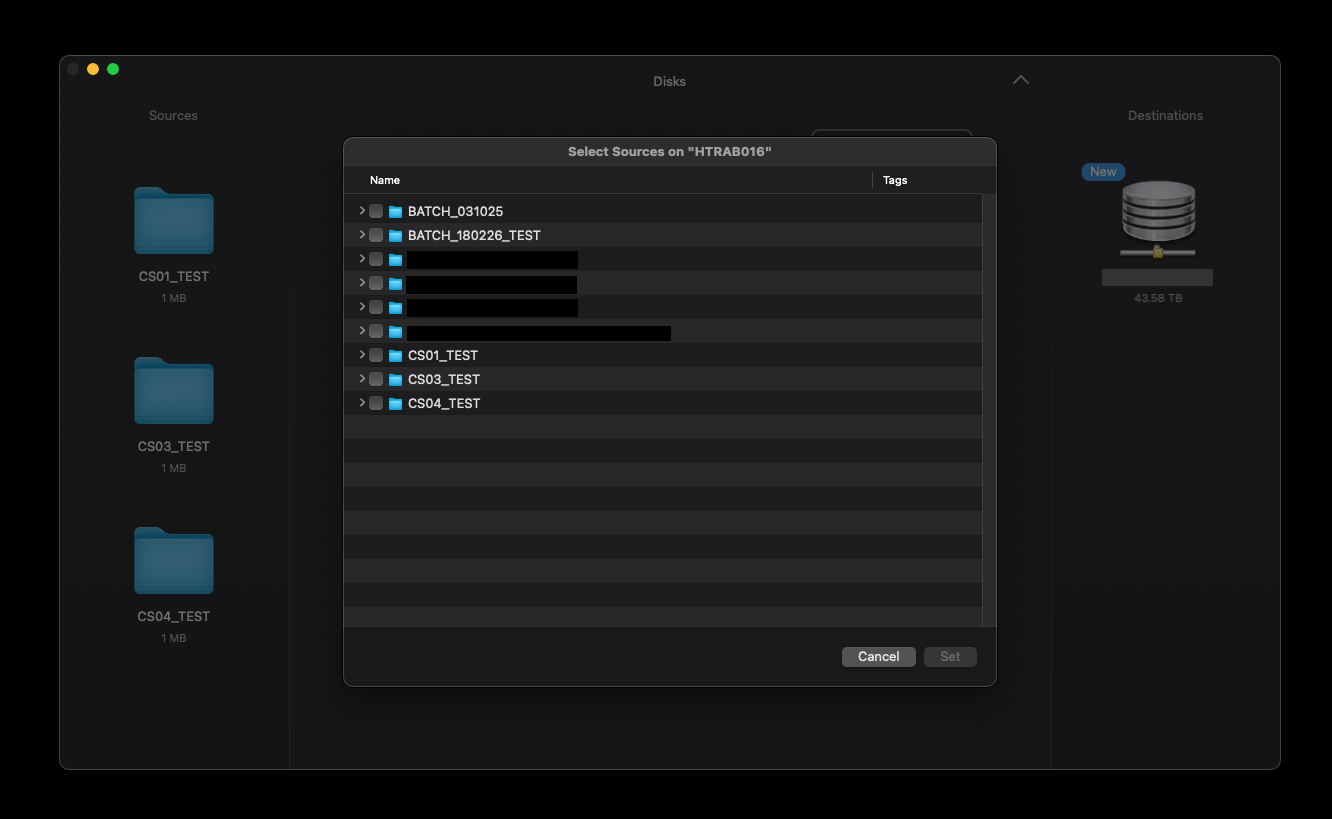
Through OffShoot’s new Ingest Browser, it became a breeze to locate these folders, and in case they have a not-very-useful name like UNTITLED, label them with a proper name. Next, instead of adding those folders as one big source, we made it possible to add them as individual sources.
One Preset
Originally, ENVY thought they needed separate presets for Camera, Sound, and miscellaneous media. OffShoot’s Pro Presets make that much easier: one preset can contain a subset of presets, so that an organization can simply distribute a single preset to all.
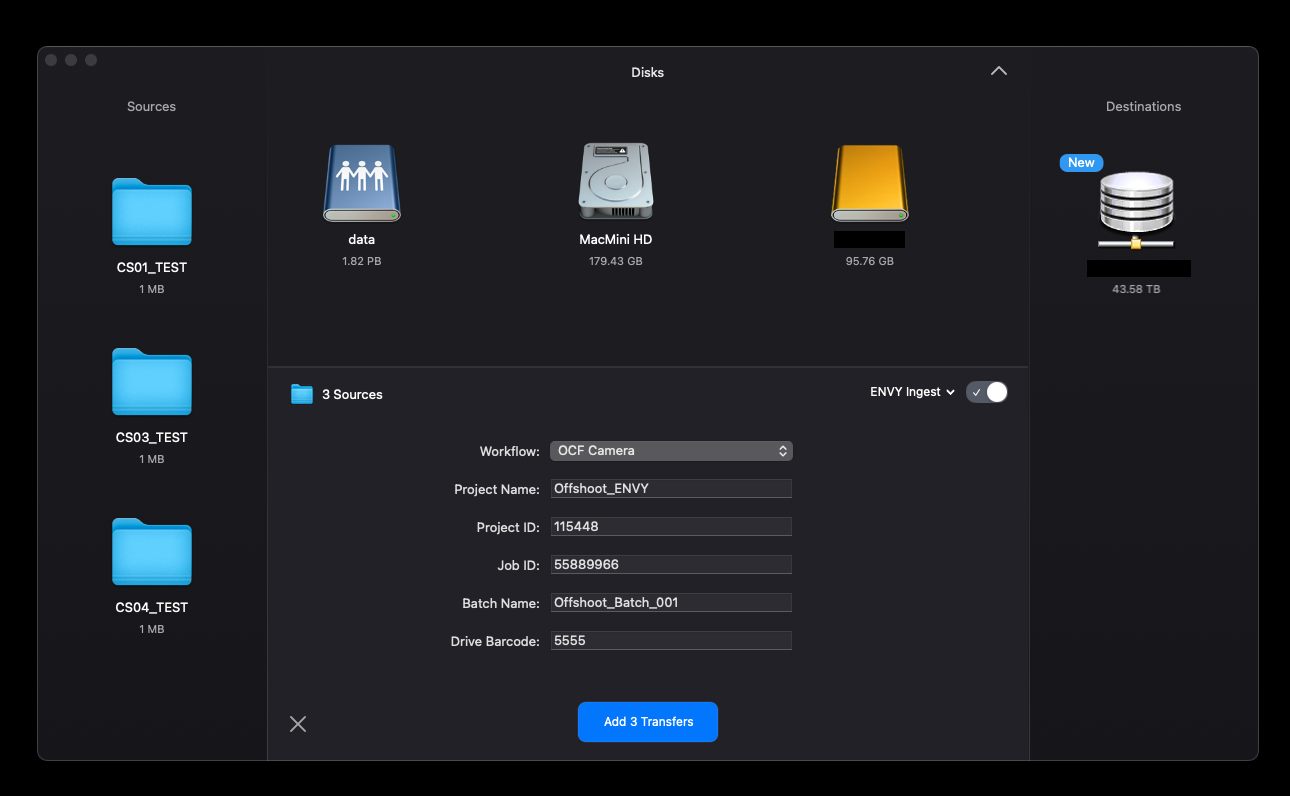
Besides selecting the source type, an ENVY employee has only a couple of things to fill out for each reel, and all else is automated based on that info and metadata. The preset, for starters, creates a folder structure on the shared storage.
For each source, OffShoot determines the oldest visible file on the source. To tune this value, there is a hidden setting to ignore certain file extensions. This timestamp is made available via a smart element in OffShoot’s organization pane, which is then used in the folder structure: {Content Date} .
That’s all that’s needed on the destination. Next up: hooking up the copy to ENVY’s other systems. All of that is kicked off by a custom Python script.
CSV Export
Triggering on the FileCopyCompleted event, first of all, all transfer information is output as a CSV file, for easy digesting with scripting tools. Also, the first and last filenames in a folder are logged. Next, EditReady Server is kicked off to extract specific clip metadata like duration, format, and codec information, and more.
On top of that, a nifty workflow is kicked off, using Finder Tags.
Finder Tags
Drives don’t always behave properly and may disconnect at random. Making it visible what has already been transferred was therefore a vital requirement in their ideal workflow. OffShoot’s robust duplicate detection would automatically pick up anything that’s already been transferred, but how do you know what actually has finished? Finder tags to the rescue.
An often undervalued macOS feature, Finder Tags offers massive flexibility. In this case, we helped ENVY with a way to automatically set a Finder Tag when a folder started transferring, and another one when it finished.
Now, it no longer matters if a computer or drive behaves badly - just reconnect the drive, browse it, and continue as if nothing happened.
Connect
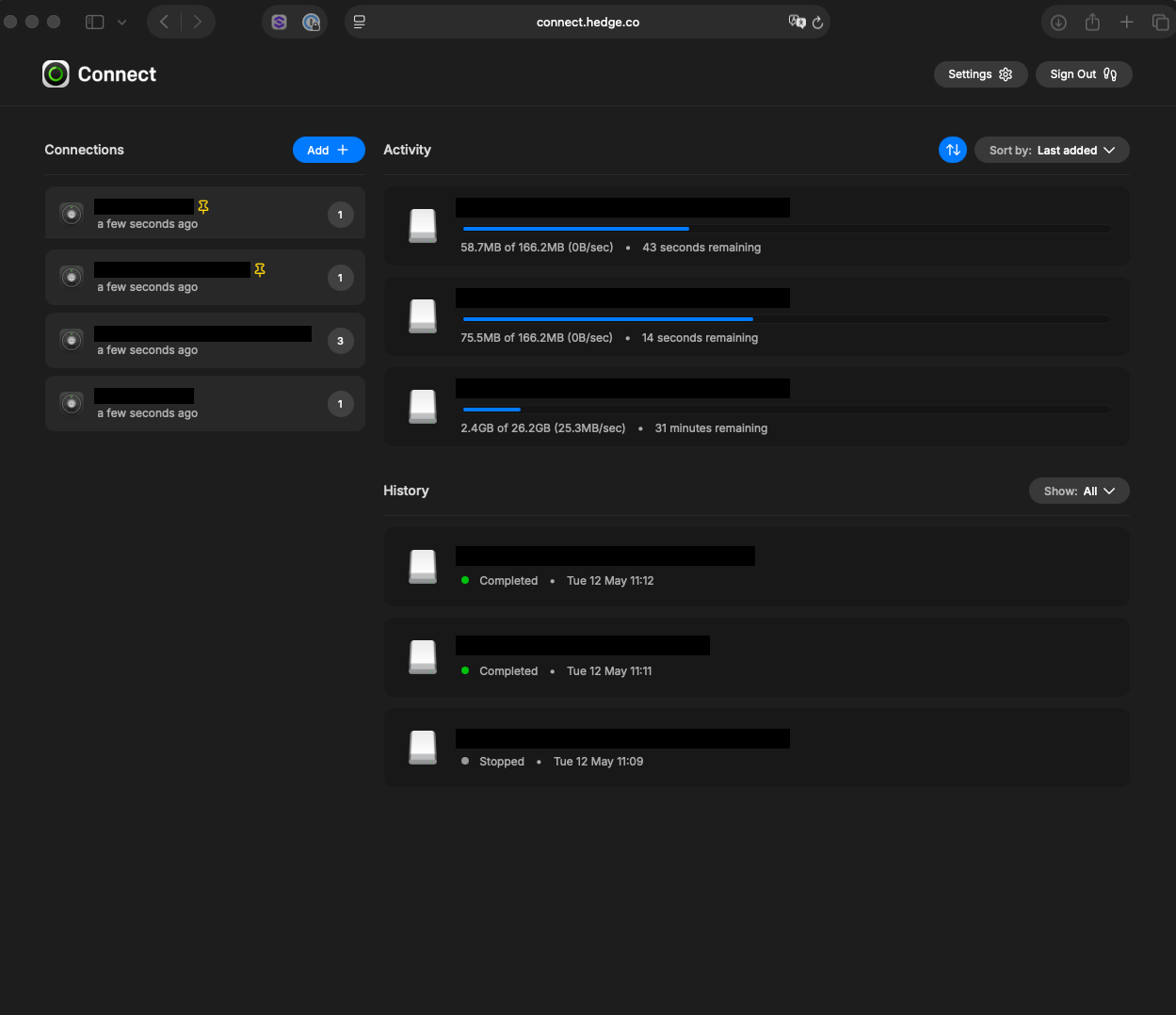
To top things off, with the scale ENVY operates, it helps to have some oversight. OffShoot’s Connect feature gives you an online dashboard with the live status of all registered computers and their transfers. For Pro users, there’s an automatic overview of all computers using a license registered to your email. That allows ENVY to see all their OffShoot machines at a glance. As ENVY uses OffShoot in more places than their media desks, they’ve pinned those connections to the top, so there’s a lot less searching required:
Bringing It All Together
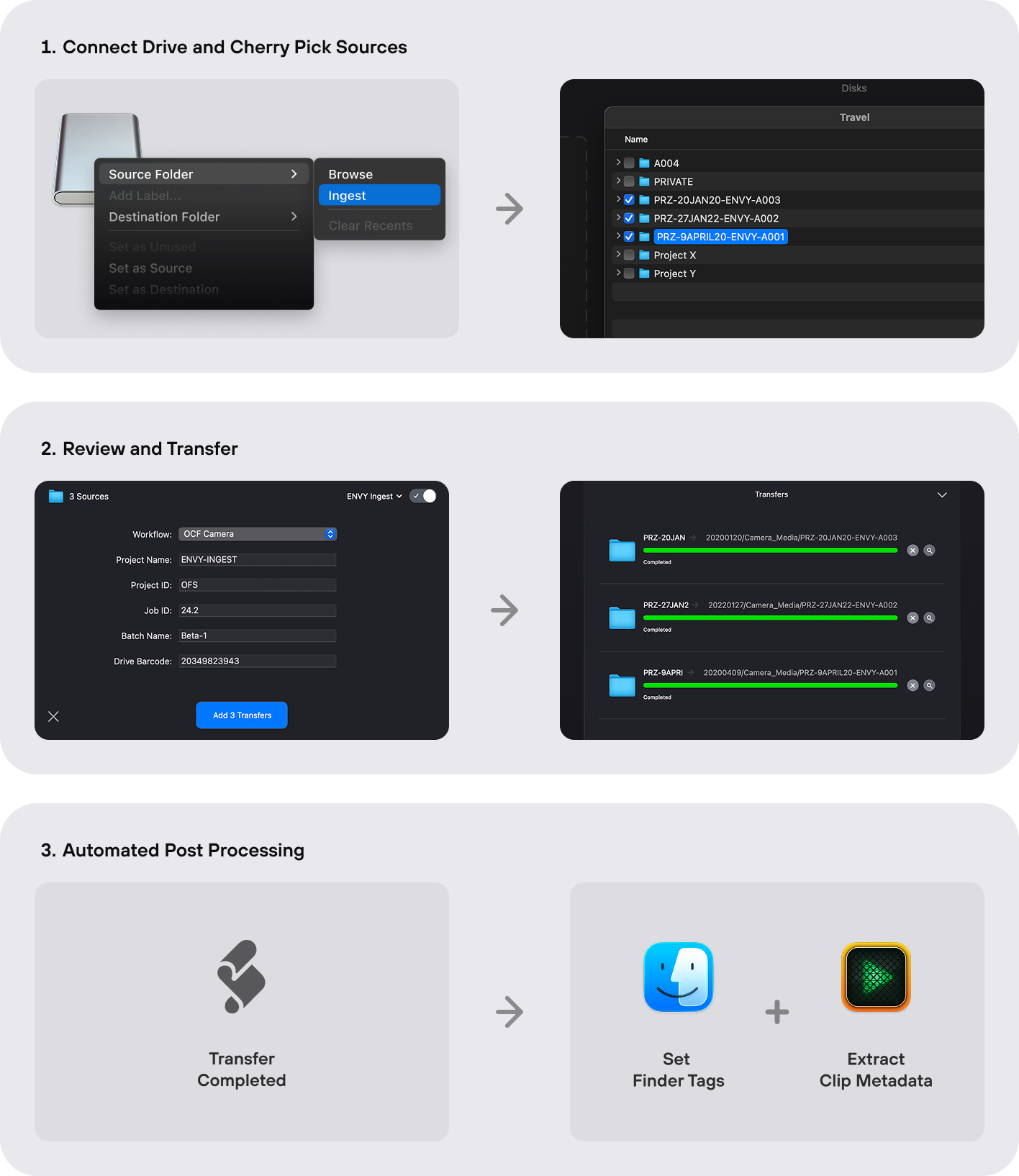
Pictures say more than words, so here’s the whole workflow:
Faster, Together
This collaboration between Hedge and ENVY perfectly embodies Hedge’s fundamental philosophy: taking care of the tedious or repetitive tasks so creative individuals don’t have to. By managing mundane work, we’re trying to let teams like ENVY do what truly matters: be creative.
The Ingest Browser is the “cherry on top” of OffShoot’s rock-solid data-management capabilities. This feature lets users cherry-pick what they need and start organizing from there. It lets them keep the received media drive’s original structure intact while creating a brand new structure on the other end of the ingest at the destination location. For ENVY’s workflow, this was a game-changer, allowing them to keep an exact record of the original drive for tracking and authenticity while reorganizing the files on their end, which aligns with their workflow.
Within a facility that operates nearly 24/7 like ENVY, zero-friction isn’t merely a desirable feature. It’s indispensable. The sheer magnitude of data and the relentless tempo of work render it infeasible to depend solely on manual processes. OffShoot Pro’s automation capabilities are imperative to keep the workflow “flowing.” By removing the tedious, error-prone chores of media organization, Hedge’s DIT tools have empowered ENVY to concentrate on what they excel at: crafting premium content.
Looking ahead, ENVY envisions automating their entire workflow with software products, boosting their operational effectiveness even further. Hedge’s aptitude for comprehending and resolving ENVY's challenges has been a turning point. With OffShoot Pro, ENVY isn’t merely maintaining pace with industry requirements; they’re elevating the standards for the way post facilities ingest their media.
“OffShoot Pro enables us to modify the folder structure of our intake without altering the source drive's structure,” remarks Jai, ENVY's Technical Operations Director. “It's significantly less disruptive than executing this procedure manually, and it allows us to maintain a record of the original source drive so we can hold a more precise database of what we are ingesting should we ever need to revisit it.”
In the end, it’s the bits like this that’s what we all do this for:
“We invariably recommend OffShoot to all of our clients as the ideal go-to for data and media management,” Jai adds.
Next Steps
We hope you enjoyed this wee case study; we sure had fun building the workflow. Did Jai’s troubles strike a chord? Got a workflow problem that’s driving you nuts? Don’t be a stranger - we’re just an email away. Whether you’re a lone wolf or managing a team, we’d love to hear about it. It wouldn’t be the first time that a single email led to a completely new feature or app…